

Buy and sell
Open any token page and hit the Trade panel on the right. Toggle Buy or Sell, pick your pay asset, enter the amount, and confirm the wallet prompt. Done.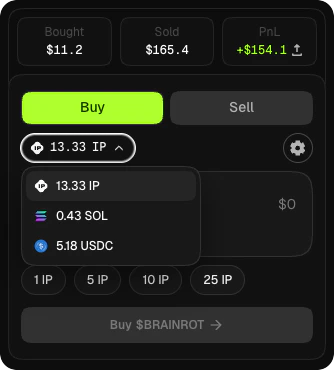
Pay assets
Three assets, two chains. All trades settle on Story.
$IP
Native gas token on Story. Default pay asset — no bridge needed.

$USDC
Works on both Story and Solana. Solana USDC is bridged to Story via Relay before the swap executes.

$SOL
Paid from your Solana embedded wallet. Bridged to Story through Relay, then swapped.
Fees
Every trade pays a swap fee — the trade panel shows the fee and your net amount before you confirm. Fees are split between the IP owner (or community treasury), UGC creators, token holders, the protocol, and the liquidity pool. For the full breakdown, see Coin types → Fee distribution.Slippage
Set your slippage tolerance in the trade panel before confirming. A tight setting on a volatile token will cause the transaction to revert if the price moves during the block. Loosen slippage for large trades or fast-moving markets.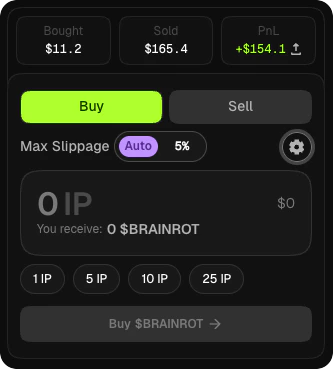
Common failures
User rejected
User rejected
You cancelled the wallet prompt. Just try again.
Insufficient funds
Insufficient funds
You need more $IP for gas, or more of the pay asset you selected. Fund your wallet from the wallet menu or the navbar deposit.
Anti-snipe limit exceeded
Anti-snipe limit exceeded
The trade would push your wallet over the 2% cap inside the 5-minute anti-snipe window on newly launched tokens. Wait for the window to pass or reduce your trade size.
Relay did not complete
Relay did not complete
A SOL or Solana USDC route failed mid-bridge. Your funds stay on the source chain. Read the error text, wait for the bridge to settle or retry — do not sign a replacement until the original has resolved.
What’s next
Trade coins
Step-by-step walkthrough of buying and selling.
Coin types
How fees split differently for creator-type vs community-type tokens.
Rewards
How trading generates rewards for holders, creators, and UGC posters.