> ## Documentation Index
> Fetch the complete documentation index at: https://docs.ip.world/llms.txt
> Use this file to discover all available pages before exploring further.
# Trade coins
> Buy and sell tokens on ip.world — step-by-step.
## Buy a token
Search or browse the feed, then tap the token you want to trade.
On the right side of the token page, make sure **Buy** is selected.
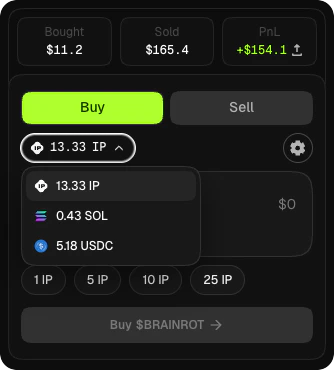
Choose **\$IP**, **\$USDC**, or **\$SOL** from the asset selector. If you pay with SOL or Solana USDC, the app bridges it to Story via Relay before the swap — you'll see the estimate before you sign.
Type how much you want to spend. The panel shows the estimated tokens you'll receive and the fee.
Tap **Buy** and approve the wallet prompt. Your new balance shows up once the transaction lands.
 ## Sell a token
Toggle to **Sell** in the trade panel on the token page.
Type how many tokens to sell, or use the percentage shortcuts (25%, 50%, 75%, 100%).
Choose which asset you want to receive. If you sell into SOL, the SOL lands in your **Solana embedded wallet**.
Tap **Sell** and approve the wallet prompt.
## Set slippage
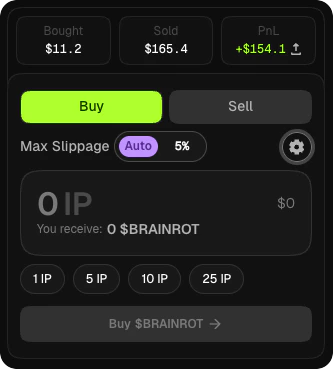
Before confirming a trade, tap the **slippage** setting in the trade panel. A tight tolerance on a volatile token will cause the transaction to revert if the price moves during the block. Loosen it for large trades or fast-moving markets.
## Sell a token
Toggle to **Sell** in the trade panel on the token page.
Type how many tokens to sell, or use the percentage shortcuts (25%, 50%, 75%, 100%).
Choose which asset you want to receive. If you sell into SOL, the SOL lands in your **Solana embedded wallet**.
Tap **Sell** and approve the wallet prompt.
## Set slippage
Before confirming a trade, tap the **slippage** setting in the trade panel. A tight tolerance on a volatile token will cause the transaction to revert if the price moves during the block. Loosen it for large trades or fast-moving markets.
 ## If something goes wrong
You cancelled the wallet prompt. Just try again.
You need more **\$IP** for gas, or more of the pay asset you selected. Fund your wallet from the wallet menu or the [Quickstart](/user-guides/getting-started#fund-your-wallet).
Your trade would push your wallet over the **2% cap** inside the 5-minute anti-snipe window on newly launched tokens. Wait for the window to pass or reduce your trade size.
A SOL or Solana USDC route failed mid-bridge. Your funds stay on the source chain. Wait for the bridge to settle or retry — don't sign a replacement until the original has resolved.
## Learn more
For a deeper look at pay assets, fees, and how cross-chain routing works, see [Trading](/user-guides/trading/overview).
## If something goes wrong
You cancelled the wallet prompt. Just try again.
You need more **\$IP** for gas, or more of the pay asset you selected. Fund your wallet from the wallet menu or the [Quickstart](/user-guides/getting-started#fund-your-wallet).
Your trade would push your wallet over the **2% cap** inside the 5-minute anti-snipe window on newly launched tokens. Wait for the window to pass or reduce your trade size.
A SOL or Solana USDC route failed mid-bridge. Your funds stay on the source chain. Wait for the bridge to settle or retry — don't sign a replacement until the original has resolved.
## Learn more
For a deeper look at pay assets, fees, and how cross-chain routing works, see [Trading](/user-guides/trading/overview).